
How to create an architecture firm website
Get a website that shows plot owners your built work and books the first site visit. No tech skills needed.
IncludedSEOEnquiriesSocialAnalytics
₹299/monthTry Free
What do you need for an architecture firm website?
Who is your firm?
- 1. Write a headline about your work
- 2. Say how you design
- 3. Write your About section
- 4. Show your built work in numbers
- 5. Use a logo and firm colours
1. Write a headline about your work
Name what you design and where, like “Houses, villas and shops designed in Siripuram, Visakhapatnam”. Put a Book a Site Visit button beside it.
See our AI Website BuilderChecklist
2. Say how you design
Give 3 plain facts about how you work: Vastu-friendly plans if asked, 3D elevations before approval, and one architect from sketch to handover.
Checklist
3. Write your About section
Say when the firm started, who the principal architect is and what you like to design, like climate-smart homes for the coast.
Checklist
4. Show your built work in numbers
Count only finished work: houses handed over, square feet built and towns you have worked in. Keep each number true.
Checklist
5. Use a logo and firm colours
A clean mark and a quiet colour palette look right on drawings, site boards and your website.
See our Business Logo MakerChecklist
What do you design?
- 1. List your project types
- 2. Explain your design stages
- 3. Explain how you charge
- 4. Add your payment options
- 5. Explain plan approval help
1. List your project types
Give each type its own section, like independent houses, duplex villas, apartment blocks, shops and offices, clinics and schools.
Checklist
2. Explain your design stages
Walk clients through each stage: site visit, concept sketch, 3D elevation, working drawings, plan approval and site supervision.
Checklist
3. Explain how you charge
Say if you charge a fixed fee, a rate per square foot or a share of construction cost, and how it splits across stages. CoA expects you to agree your charges before you start.
See our AI Website EditorChecklist
4. Add your payment options
Let clients pay the site visit fee and each stage payment by UPI, and say if you accept bank transfer for larger amounts.
See our UPI Payments on WebsiteChecklist
5. Explain plan approval help
Say which approvals you handle, like building plan approval from GVMC or VMRDA, and the papers the owner must bring, like the sale deed and tax receipt.
Checklist
How can clients check your work?
- 1. Show your CoA registration
- 2. Build a project portfolio
- 3. Introduce your team
- 4. Show reviews from clients
- 5. Answer common questions
1. Show your CoA registration
Add each architect's name, degree and Council of Architecture registration number, so clients can check it on the CoA website.
Checklist
2. Build a project portfolio
For each project, show the plot size, the brief and photos of the finished building next to its 3D view. Name the client only with their consent.
See our AI Website EditorChecklist
3. Introduce your team
Add the associate architects, the site engineer and the structural consultant you work with, with their roles.
Checklist
4. Show reviews from clients
Add 3 to 5 reviews from owners who moved in, with their consent, and link to your Google reviews.
Checklist
5. Answer common questions
Answer what plot owners ask first: “How long does plan approval take?”, “Can you work with my builder?”, “Do you design Vastu-friendly homes?”. Clear answers also help Google and AI assistants describe your firm.
See our Automatic Website SEOChecklist
How can clients reach your firm?
- 1. Add a site visit request form
- 2. Add phone, WhatsApp and email
- 3. Clearly show your location
- 4. Add your working hours
- 5. Add your social media links
- 6. Offer your website in local languages
1. Add a site visit request form
A Book a Site Visit button on every page. Ask for the plot location, plot size, what they want to build and a rough budget.
See our Leads, Orders & AppointmentsChecklist
2. Add phone, WhatsApp and email
Show your studio phone, WhatsApp and email on every page. Many owners send a photo of their plot or layout copy first.
Checklist
3. Clearly show your location
Add your studio address with a landmark and a Google Map, so clients can visit you with their plot papers.
Checklist
4. Add your working hours
Show your studio hours, and say when site visits happen, like weekday mornings or Saturdays.
Checklist
5. Add your social media links
Link your Instagram, LinkedIn, Facebook and YouTube pages in the footer.
Checklist
6. Offer your website in local languages
Show your design stages and fees in Telugu, Hindi or Odia, so parents building for the family can follow every step.
See our Multi-language WebsiteChecklist
How to host and maintain your website?
- 1. Choose a domain name
- 2. Put your website on hosting
- 3. Turn on SSL
- 4. Make your website open fast (CDN)
- 5. Keep backups of your website
- 6. Keep your website up to date
1. Choose a domain name
Keep it close to your firm name, like lineformarchitects.in. Add your city if the name is taken.
See our Domain Name GeneratorChecklist
2. Put your website on hosting
Hosting keeps your portfolio open for NRI clients who browse from another time zone.
See our Website Hosting & SSLChecklist
3. Turn on SSL
SSL puts a lock next to your web address and protects plot papers and budgets that clients send you.
See our Website Hosting & SSLChecklist
4. Make your website open fast (CDN)
A CDN keeps copies of your website in many cities, so large project photos load fast on a phone.
See our Website Hosting & SSLChecklist
5. Keep backups of your website
A daily backup keeps years of project photos, 3D views and write-ups safe.
See our Website Hosting & SSLChecklist
6. Keep your website up to date
Add each handed-over project, change your fees when they change, and add new architects with their CoA numbers.
See our AI Website EditorChecklist
Pick your services, see your architecture firm website
Get my websiteHow to get more enquiries & clients for your architecture firm
SEO – Get found on Google & AI
- 1. Set up and update your website SEO
- 2. Set up your Google Business Profile
- 3. Check Google can find your site
- 4. List your firm on directories
- 5. Ask clients for Google reviews
1. Set up and update your website SEOOngoing
Do this with your website, then keep it current. Give Google and AI assistants a clear picture of your firm: keywords for your project types and area, a page title and description, one main heading (H1) on each page, a favicon, and structured data with your address, phone and hours.
See our Automatic Website SEOChecklist
2. Set up your Google Business ProfileOne time
Use the same firm name, address and phone as your website. Pick “Architect” as your main category, and add photos of finished buildings.
Checklist
3. Check Google can find your siteOne time
Make sure your website is on Google, so people searching for an architect in your city can see it.
See our Google Search CheckChecklist
4. List your firm on directoriesOne time
CoA allows your name in trade directories and websites. Use the same name, address and phone everywhere.
Checklist
5. Ask clients for Google reviewsOngoing
Ask at handover, when the family has just moved in. Never offer a gift or fee cut for a review.
Checklist
Social Media Marketing
- 1. Set up Instagram, LinkedIn, FB
- 2. Share one project post every week
- 3. Post on dates your clients plan
1. Set up Instagram, LinkedIn, FBOne time
Use your firm name and logo on all three. Instagram suits project photos, LinkedIn suits builders and companies.
Checklist
2. Share one project post every weekOngoing
Show your own work and explain it. Keep it to facts about the project, not offers.
See our Social Media MarketingPost ideas
3. Post on dates your clients planOngoing
Plan a post a few weeks before the times families decide to build.
Occasion ideas
WhatsApp Marketing
- 1. Set up your WhatsApp Business profile
- 2. Post on WhatsApp status weekly
- 3. Send project updates to clients
- 4. Share news with past clients
1. Set up your WhatsApp Business profileOne time
Add your firm name, logo, studio hours, address and the project types you take.
Checklist
2. Post on WhatsApp status weeklyOngoing
Pick one idea a week. Everyone who saved your number sees it for a day.
See our WhatsApp Status Post MakerStatus ideas
3. Send project updates to clientsOngoing
Keep each active client up to date. Send a message at each stage, with photos and what comes next.
See our Leads, Orders & AppointmentsReminder ideas
4. Share news with past clientsOngoing
Send one message a month to past clients only. Share facts about your work, not discounts. CoA does not allow commissions or gifts for bringing in work.
Message ideas
Paid Ads on Google, Insta, FB
- 1. Run Google Ads for nearby searches
- 2. Run Instagram and Facebook ads
1. Run Google Ads for nearby searchesOne time
Paid ads that sell your services can break the CoA rule against advertising.
Not the best fit for an architecture firm
- Instead
- Put the time into your Google Business Profile, directory listings and a new project page each month. These reach the same searchers without an ad.
- Why?
- The Architects (Professional Conduct) Regulations, 1989 say an architect shall not advertise their services. Name listings in directories and on a website are allowed. Ask the Council of Architecture before you run any paid ad.
Checklist
2. Run Instagram and Facebook adsOne timeOngoing
Boosted posts put your firm in front of strangers as an advert, which CoA's rules do not allow.
Not the best fit for an architecture firm
- Instead
- Post your projects on your own pages and send them to past clients on WhatsApp. Families share good homes with friends who are about to build.
- Why?
- CoA lets your name appear with pictures of your work in the media, as long as you do not pay for it. A paid boost is a paid advert.
Set up once
Every month
Others
- 1. Put your website link everywhere
- 2. Print a QR code poster
- 3. Check visits and enquiries monthly
1. Put your website link everywhereOne time
CoA lets your name appear on your own website and in directories. Add the link to everything you already hand clients.
Checklist
2. Print a QR code posterOne time
Owners scan it at your studio to see finished projects, or at handover to leave a review.
See our QR Code Poster MakerChecklist
3. Check visits and enquiries monthlyOngoing
See which project types and plot sizes people open most, and add more of that work to your portfolio.
See our Website AnalyticsChecklist
Pick your services, see your architecture firm website
Tap the services you offer
Enter architecture firm name
Get an architecture firm website & marketing tools in 3 steps
Type your firm and what you design
Your firm name, the buildings you design and your area. We write the rest.
Firm name. Type it the way it reads on your site boards, like "Lineform Architects".
What you design. Separate with commas. Independent houses, villas, apartments, commercial buildings, Vastu-friendly plans, 3D elevations, GVMC plan approval.
Registration and area. Say your architects are CoA registered, and add Siripuram, Visakhapatnam, so plot owners nearby find you.
What you will see 
See 6 architecture firm websites
Each design is laid out for an architecture firm, with words and pictures in place. Want other options? Generate again.
Portfolio first. Large project images, clean type and plenty of white space, on a phone and a computer.
Site visits built in. Project types, design stages, Book a Site Visit, UPI, WhatsApp and FAQs are already on the page.
Words for people who are building. Headlines like "Certified architects crafting vastu-compliant residential buildings" speak to the owner of a plot.
What you will see 
Choose one and book site visits
Pick the design that fits your work and go live. Owners can request a site visit the same day.
Choose your design. Pick the look closest to your own drawings. You can switch designs any time.
Go live. Your website takes site visit requests as soon as you choose.
Add your own details. Upload finished project photos, each architect's CoA number and your stage-wise fee split.
What you will see 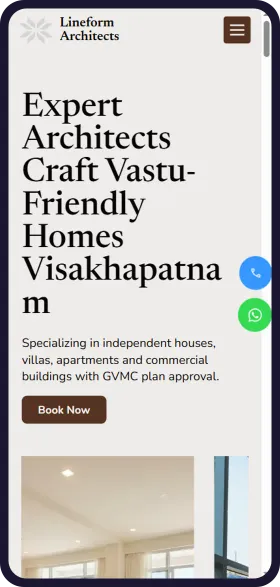
See your architecture firm website in 1 minute
Open Weaver Studio builds it for you. Type your business name, pick from 6 designs and see it free. No tech skills needed.
FREELeadsSEOSocialAnalytics
₹299/monthSave ₹20,000





6,500+ Businesses
trust Open Weaver

How plot owners find an architecture firm online
Trending services
Independent house design
Most enquiredMost enquiries start with a plot and a family brief. Lead with house projects.
3D elevation
RisingOwners want to see the front of the house before they agree. Show 3D views in every project.
Plan approval help
SteadyEvery new building needs it. Explain the steps and the usual time.
Vastu-friendly plans
SteadyMany families ask for it. Show how you fit Vastu into a good plan.
Duplex villas
RisingLarger plots in growing suburbs. Show villas with car parking and terrace use.
Shop and office fit-outs
SeasonalOwners plan openings before festivals. Share finished shopfronts a few months before.
How plot owners search for an architecture firm on Google
architect near me for house planNearby
Google shows nearby firms first. Keep your studio address the same everywhere.
architects in SiripuramBy area
Put your locality and city in your website title and address.
best architects in VisakhapatnamBy city
People compare portfolios and stars. Put finished projects and reviews near the top.
architect fees per sq ftBy price
Explain how you charge and how it splits across stages.
30x40 house plan with car parkingBy plot size
Owners search by plot size. Show plans you have built for common plot sizes.
3D elevation design for G+2 houseBy service
Show 3D views next to photos of the finished building.
Vastu house plan east facingBy service
Say if you design to Vastu when the client asks, with an example plan.
GVMC building plan approval architectBy approval
Plan approval worries owners. List the approvals you handle and the papers needed.
architect for NRI house construction IndiaFor NRIs
NRIs want updates from abroad. Say how you share drawings and site photos online.
How you look on Google
Your Firm | Architects in Siripuram, Visakhapatnam
CoA registered architects in Siripuram, Visakhapatnam. Houses, villas, apartments and commercial buildings, 3D elevations and plan approval help.
- Projects
- Our architects
- Design fees
- Book site visit
How plot owners ask AI about an architecture firm
Which architect in Visakhapatnam designs villas and handles plan approval?
People now ask ChatGPT and other AI assistants. Clear project types, your area and approval help let them name your firm.
How you show up in AI chatbots
Can you suggest an architect in Siripuram, Visakhapatnam who designs villas and helps with plan approval?
Your Firm in Siripuram, Visakhapatnam is a firm of CoA registered architects that designs independent houses, villas and commercial buildings. It prepares 3D elevations and helps with GVMC plan approval. You can book a site visit on its website or on WhatsApp.
yourarchitects.comSample answer. ChatGPT, Gemini and others each word it their own way.
Online rules to know
Get consent for plot and family details
All businessesTell owners why you need their name, phone, plot papers and budget, and get their consent. Use them only for their project, and delete what you no longer need.
Show only your own work
All businessesDo not post renders or photos of buildings you did not design, or promise an approval date you cannot control. Every project and number must be true.
Use “architect” only if registered
Architecture FirmOnly people registered with the Council of Architecture may call themselves architects. Show each architect's CoA registration number, and do not use the title for a draughtsman or designer who is not registered.
Do not advertise your services
Architecture FirmAn architect may not advertise or pay for publicity. Your website, directory listings and unpaid features of your work are allowed. Do not give or take commissions or gifts for bringing in clients.
See before you pay
- Enter details and see 6 free custom websites
- Select and pay only if you like it
- Free support
- 7-day risk-free trial