
How to create an insurance agent website
Your complete guide to getting a website for your insurance agency: what to put on it, how families search for cover, how to market it and the online rules to follow.
IncludedSEOEnquiriesSocialAnalytics
₹299/monthTry Free
What do you need for an insurance agent website?
Why should families choose you?
- 1. Write a clear headline
- 2. Show what makes you different
- 3. Write your About section
- 4. Show your numbers
- 5. Use a logo and agency colours
1. Write a clear headline
Say what you help with and where, in one line, like “Life, health and motor insurance help in RS Puram”. Put a Request a Callback button right beside it.
See our AI Website BuilderChecklist
2. Show what makes you different
Give 3 reasons to pick you, near the top: you compare plans for the family's needs, you remind them before every renewal, and you stand with them when they claim.
Checklist
3. Write your About section
Say when you became an agent, why you started and who you mostly help, like young families, small traders or retired parents. Add a photo of you at your desk.
Checklist
4. Show your numbers
Numbers make a stranger feel safe: years as an agent, families you look after and claims you helped with. Keep every number true, and never use sales awards or rankings.
Checklist
5. Use a logo and agency colours
A steady logo on your website, visiting card and policy folder makes a one-person agency look settled and easy to remember.
See our Business Logo MakerChecklist
What cover do you help with?
- 1. List the cover you help with
- 2. Show the insurers you represent
- 3. Explain your free policy review
- 4. Explain your claim help
- 5. Explain renewals and payments
1. List the cover you help with
Name each type in plain words, like term life, family health, senior citizen health, car and two-wheeler, child education and travel cover. Say who each one is for.
See our AI Website EditorChecklist
2. Show the insurers you represent
List the insurers whose policies you can sell. Ask each insurer before you use its name or logo, and use the material it gives you.
Checklist
3. Explain your free policy review
Say what you check when someone brings old policies, like the sum insured, nominee, waiting periods and renewal dates. Say it is free and takes about 30 minutes.
Checklist
4. Explain your claim help
Tell clients what you do when they claim, like cashless hospital help, filing papers and following up with the insurer. Give one number to call.
Checklist
5. Explain renewals and payments
Say that premiums are paid to the insurer on its own link or at its office, so the receipt is in the client's name. Add the renewal reminders you send.
See our UPI Payments on WebsiteChecklist
How can clients trust you?
- 1. Show your licence details
- 2. Introduce yourself and your team
- 3. Show your office
- 4. Show reviews from clients
- 5. Answer common questions
1. Show your licence details
Add your agent licence or code number, the insurer that appointed you and the date it is valid till. People can then check you are licensed.
Checklist
2. Introduce yourself and your team
Add a photo and one line for each person a client may talk to, like you, a family member who handles renewals or a claims helper.
Checklist
3. Show your office
Real photos of your office front, your desk and the board outside. Clients want to know where to walk in when they need help with a claim.
See our AI Website EditorChecklist
4. Show reviews from clients
Add 3 to 5 real reviews about a claim that went through, a renewal you caught in time or a plan you explained clearly. Take consent and leave out claim amounts.
Checklist
5. Answer common questions
Add short answers to what people ask you: “How much term cover do I need?”, “Does health insurance cover my parents?”, “What is a waiting period?”. Clear answers also help Google and AI assistants describe you.
See our Automatic Website SEOChecklist
How can clients reach you?
- 1. Add a callback form
- 2. Add phone, WhatsApp and email
- 3. Show your office on a map
- 4. Add your working hours
- 5. Add your social media links
- 6. Offer your website in local languages
1. Add a callback form
A Request a Callback button on every page. Ask for the name, phone, the cover they want and a good time to call.
See our Leads, Orders & AppointmentsChecklist
2. Add phone, WhatsApp and email
Show your phone, WhatsApp and email at the top and bottom of every page. Many clients send a photo of their old policy on WhatsApp first.
Checklist
3. Show your office on a map
Add your full address with a landmark and a Google Map. Say if you also visit clients at home or at their shop.
Checklist
4. Add your working hours
Show office hours, Sunday hours and a number for claims after hours. Many people can only meet after work or on weekends.
Checklist
5. Add your social media links
Link your Facebook, Instagram and LinkedIn in the menu or the footer.
Checklist
6. Offer your website in local languages
Show what each cover means, waiting periods and claim steps in Tamil, Malayalam or whichever language your clients read best.
See our Multi-language WebsiteChecklist
How to host and maintain your website?
- 1. Choose a domain name
- 2. Put your website on hosting
- 3. Turn on SSL
- 4. Make your website open fast (CDN)
- 5. Keep backups of your website
- 6. Keep your website up to date
1. Choose a domain name
This is your website address, like kavachinsure.in. Use your agency name, and add your city if the name is taken.
See our Domain Name GeneratorChecklist
2. Put your website on hosting
Hosting keeps your website online, so a family comparing plans at 11 pm can still ask you to call.
See our Website Hosting & SSLChecklist
3. Turn on SSL
SSL puts a lock next to your web address and keeps ages, phone numbers and health details safe when clients send them.
See our Website Hosting & SSLChecklist
4. Make your website open fast (CDN)
A CDN keeps copies of your website in many cities, so your page opens fast when a client forwards it to family abroad.
See our Website Hosting & SSLChecklist
5. Keep backups of your website
A backup is a saved copy of your website, made every day, so your cover pages and client reviews are never lost.
See our Website Hosting & SSLChecklist
6. Keep your website up to date
Update the insurers you represent, your licence validity and your office hours whenever they change. Pick a website you can edit from your phone.
See our AI Website EditorChecklist
Pick your cover, see your insurance agent website
Get my websiteHow to get more enquiries & clients for your insurance agency
SEO – Get found on Google & AI
- 1. Set up and update your website SEO
- 2. Set up your Google Business Profile
- 3. Check Google can find your site
- 4. List on business directories
- 5. Ask clients for reviews
1. Set up and update your website SEOOngoing
Do this with your website, then keep it current. Give Google and AI assistants a clear picture of your agency: keywords for your cover and area, a page title and description, one main heading (H1) on each page, a favicon, and structured data with your address, phone and hours.
See our Automatic Website SEOChecklist
2. Set up your Google Business ProfileOne time
Use the same name, address and phone as your website. Pick “Insurance agency” as your main category, and add the cover types as services.
Checklist
3. Check Google can find your siteOne time
Make sure your website is on Google, so people searching for an insurance agent in your area can see it.
See our Google Search CheckChecklist
4. List on business directoriesOne time
Use the same name, address and phone everywhere, and link back to your website.
Checklist
5. Ask clients for reviewsOngoing
Ask after a claim is settled or a renewal is done. That is when clients are most thankful.
Checklist
Social Media Marketing
- 1. Set up Facebook and Instagram
- 2. Share one cover tip every week
- 3. Share posts on special occasions
1. Set up Facebook and InstagramOne time
Use your agency name and logo on both. Add LinkedIn if you sell to companies.
Checklist
2. Share one cover tip every weekOngoing
Pick one idea a week. Explain cover in plain words, and use your insurers' approved material for any plan or benefit.
See our Social Media MarketingPost ideas
3. Share posts on special occasionsOngoing
Plan a post a few weeks before the days your clients think about money and family. Share facts, not fear.
Occasion ideas
WhatsApp Marketing
- 1. Set up your WhatsApp Business profile
- 2. Post on WhatsApp status weekly
- 3. Send reminders before renewals
- 4. Share news and seasonal reminders
1. Set up your WhatsApp Business profileOne time
Add your agency name, logo, office hours, address and licence details.
Checklist
2. Post on WhatsApp status weeklyOngoing
Pick one idea a week. Everyone who saved your number sees it for a day.
See our WhatsApp Status Post MakerStatus ideas
3. Send reminders before renewalsOngoing
Message each client before their policy renews. Use their name, the policy and the date, and add the insurer's official payment link.
See our Leads, Orders & AppointmentsReminder ideas
4. Share news and seasonal remindersOngoing
Send one message a month to your broadcast list of clients. Share clear facts, not pressure or promises.
Message ideas
Paid Ads on Google, Insta, FB
- 1. Run Google Ads for nearby searches
- 2. Run Facebook and Instagram ads
1. Run Google Ads for nearby searchesOne time
Google Ads puts your agency at the top of Google and on Google Maps when people nearby search for an insurance agent.
Best campaign for an insurance agent
- Campaign
- Search, with your office location added
- Where?
- At the top of Google search results, marked “Sponsored”. With your location added, it also shows on Google Maps, with Directions and Call buttons.
- Who?
- People in or regularly near your city who search for an agent or a type of cover. Set this under Locations: add a radius around your office, and under Location options choose “Presence: People in or regularly in your included locations”.
- Targeting tips
- Radius: 8–15 km in a city, as clients are happy to talk on the phone first
- Keywords: “insurance agent near me”, “health insurance agent [your city]”, “term insurance advisor”, “insurance agent in [your area]”
- Negative keywords: job, agent recruitment, how to become agent, exam, salary, commission, customer care number
- Ad schedule: evenings and weekends, when families talk about money
- Budget: ₹300–₹800 a day to start. Give it 2 weeks before changing anything
- Google may ask you to complete financial services verification before your ads run. Keep your licence details ready
- Why?
- People who search for an agent are ready to talk. A local Search ad with a Call button gets you the call before they open a comparison site.
Checklist
2. Run Facebook and Instagram adsOne timeOngoing
Meta ads show your agency to families in your city while they scroll Facebook and Instagram.
Best campaign for an insurance agent
- Campaign
- Click-to-WhatsApp ad
- Where?
- In the Facebook feed and in Instagram feed, Stories and Reels. Tapping the ad opens a WhatsApp chat with you.
- Who?
- Adults in your city. Set this under Audience: drop a pin on your office and set the radius. If Ads Manager asks, choose the special ad category for financial products and services; age and some targeting options may then be fixed for you.
- Targeting tips
- Radius: your city, or the localities you can visit
- Age: 25–60, the people who buy cover for themselves and their parents, where Meta allows it
- Language: match the language of your ad
- Placements: leave on automatic
- Budget: ₹200–₹500 a day. Run it for at least 7 days before you judge it
- Ad: lead with a free policy review or claim help. Do not promise returns or name a plan's benefits without your insurer's approval
- Why?
- Few people go looking for cover until something makes them think. A free review offer makes it easy to ask one question on WhatsApp.
Set up once
Every month
Others
- 1. Put your website link everywhere
- 2. Print a QR code poster
- 3. Share your link with partners
- 4. Check visits and enquiries monthly
1. Put your website link everywhereOne time
On paper and online: every place a client sees your name.
Checklist
2. Print a QR code posterOne time
Visitors scan it to save your number, ask for a policy review or leave a review after a claim.
See our QR Code Poster MakerChecklist
3. Share your link with partnersOne timeOngoing
Chartered accountants, car dealers and housing societies meet people who need cover. Send them one link with what you help with.
Checklist
4. Check visits and enquiries monthlyOngoing
See which cover people read about most, and move it higher on your page.
See our Website AnalyticsChecklist
Pick your cover, see your insurance agent website
Tap the cover you offer
Enter agency name
Get an insurance agent website & marketing tools in 3 steps
Type your agency and the cover you sell
Your agency name and the cover you help with. That is enough for us to start.
Agency name. Type it the way it is printed on your visiting card, like "Kavach Insurance Advisors".
Your cover. Separate the types with commas. Term life, family health, motor, child plans, renewals and claim help.
Experience and area. Add your years as an agent, your locality and city, so families nearby can ask you to call.
What you will see 
See 6 insurance agent websites
Each design is laid out for an insurance agent, with words and pictures already in place. Want other options? Generate again.
A calm, trustworthy layout. Designs that put your cover types, experience and contact details where a worried family looks first.
Callbacks built in. Cover types, reviews, Request a Callback, WhatsApp and FAQs are already on the page.
Written for families. Headlines like "Reliable Insurance Plans with 14 Years Expertise" speak to a parent who wants the right cover and someone to call at claim time.
What you will see 
Pick one and start taking callbacks
Choose the design that suits your agency and go live. Families can ask you to call the same day.
Choose your design. Pick the one that feels like your agency. You can switch to another design any time.
Go live. Your website takes callback requests the moment you choose.
Add your own details. Add your licence or agent code, the insurers you represent and your claim helpline number.
What you will see 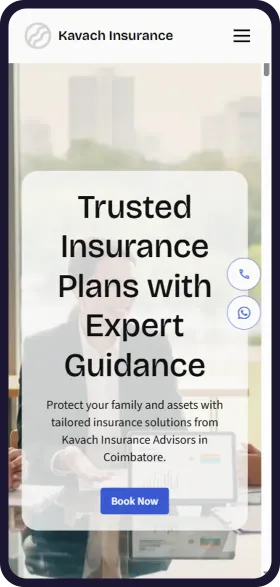
See your insurance agent website in 1 minute
Open Weaver Studio builds it for you. Type your business name, pick from 6 designs and see it free. No tech skills needed.
FREELeadsSEOSocialAnalytics
₹299/monthSave ₹20,000





6,500+ Businesses
trust Open Weaver

How families find an insurance agent online
Trending cover
Family health insurance
Most enquiredThe top question for most agents. Explain what a family floater is and what you check.
Term life cover
RisingYoung parents with home loans ask for it. Explain how much cover a family needs.
Senior citizen health cover
RisingChildren abroad and in other cities buy for parents. Make it easy to call from anywhere.
Car and two-wheeler renewals
SteadyEvery vehicle renews each year. Reminders bring the same clients back.
Tax-saving cover
SeasonalQuestions jump from January to March. Post about Section 80C and 80D before then.
Claim help
SteadyA claim is when clients need you most. Show what you do and how fast to reach you.
How clients search for an insurance agent on Google
insurance agent near meNearby
The most common search. Google shows agents close to the person first.
insurance agent in RS PuramBy area
Put your locality and city in your website title and address.
best health insurance advisor in CoimbatoreBy city
People compare reviews and years of experience. Show both near the top.
health insurance claim help urgentUrgent
Families search from the hospital. Show your claim number in large text.
term insurance 1 crore premium for 30 year oldBy price
People want a rough idea first. Offer a callback with a quote from the insurer.
family floater health insurance for 4 membersBy cover
Give family health cover its own section, and say what you check for families.
car insurance renewal near meBy cover
Renewals are quick wins. Make motor renewal easy to ask for on WhatsApp.
health insurance for parents above 60For parents
Children often buy for their parents. Explain senior citizen cover in plain words.
LIC agent open on SundayBy timing
Many people only have Sunday free. Show your Sunday hours clearly.
How you look on Google
Your Agency | Insurance Agent in RS Puram, Coimbatore
IRDAI licensed agent for term life, family health and motor insurance in RS Puram. Free policy review, renewal reminders and claim help.
- Cover we offer
- Claim help
- About us
- Request a callback
How clients ask AI about an insurance agent
Which insurance agent near me helps with health claims and renewals?
People now ask ChatGPT and other AI assistants. Clear cover types, claim help and your area help them name you.
How you show up in AI chatbots
Is there an insurance agent in RS Puram, Coimbatore who helps with health insurance claims and renewals?
Your Agency in RS Puram, Coimbatore is a licensed insurance agent for term life, family health and motor cover. It offers a free policy review, sends reminders before renewals and helps with cashless and reimbursement claims. You can request a callback on its website or on WhatsApp.
yourinsuranceagency.comSample answer. ChatGPT, Gemini and others each word it their own way.
Online rules to know
Get consent for client details
All businessesTell people why you need their age, phone number and health details when they ask for a quote, and get their consent. Share them only with the insurer they choose.
Keep your claims honest
All businessesYour years of experience, families served and claim help must be true. Do not claim “100% claim settlement”, “guaranteed returns” or “No. 1 agent in Coimbatore”.
Show your licence and stay licensed
Insurance AgentSell only for the insurers that appointed you, and only while your licence is valid. Show your agent code and the appointing insurer on your website, so clients can check them.
Rule: Insurance Act, 1938 (Section 42) and IRDAI rules for insurance agents
Follow IRDAI rules for insurance ads
Insurance AgentYour website and posts count as insurance ads. Use your insurers' approved material for plan names, benefits and costs, never show sales awards or rankings, and never sell a ULIP as an investment.
Rule: IRDAI (Protection of Policyholders' Interests) Regulations, 2024 and its master circular
See before you pay
- Enter details and see 6 free custom websites
- Select and pay only if you like it
- Free support
- 7-day risk-free trial