
How to create a cafe & coffee shop website
Get a website that puts your menu in front of hungry people nearby and fills your tables on weekends. No tech skills needed.
IncludedSEOBookingsSocialAnalytics
₹299/monthTry Free
What do you need for a cafe & coffee shop website?
Why visit your cafe?
- 1. Write an inviting headline
- 2. Show what makes your cafe special
- 3. Tell your cafe's story
- 4. Show your numbers
- 5. Use a logo and cafe colours
1. Write an inviting headline
Say what you serve and where, like “Specialty coffee and all-day breakfast in White Town, Puducherry”. Put a Book a Table button beside it.
See our AI Website BuilderChecklist
2. Show what makes your cafe special
Give 3 reasons to drop in: beans roasted in-house, a quiet corner with Wi-Fi for laptops, a garden courtyard or dogs allowed.
Checklist
3. Tell your cafe's story
Say who started it, where the beans come from and what inspired the menu, like weekend trips to Coorg estates.
Checklist
4. Show your numbers
Small proof works: cups poured a day, dishes on the menu, years open. Keep each number honest.
Checklist
5. Use a logo and cafe colours
A simple logo that works on cups, sleeves and the board outside helps guests tag you on Instagram.
See our Business Logo MakerChecklist
What's on your menu?
- 1. Put your full menu with prices
- 2. Mark veg, egg and allergens
- 3. Add specials and combos
- 4. Take pre-orders and bookings
- 5. Show your space
1. Put your full menu with prices
Split it into coffee, cold drinks, breakfast, mains and desserts. Add a price for every item and a photo for your best sellers.
See our AI Website EditorChecklist
2. Mark veg, egg and allergens
Mark each dish veg or non-veg, and flag egg, milk, nuts and gluten. Add vegan or oat milk options if you have them.
Checklist
3. Add specials and combos
Show your weekend brunch, breakfast combo or happy hour on coffee, with the price and days it runs.
Checklist
4. Take pre-orders and bookings
Let guests pre-order cakes and book the cafe for birthdays or small groups, with an advance by UPI.
See our UPI Payments on WebsiteChecklist
5. Show your space
Show your seating, outdoor tables, laptop corner, charging points, washroom and any pet-friendly area.
Checklist
Why trust your cafe?
- 1. Show your FSSAI number
- 2. Introduce your team
- 3. Add a photo gallery
- 4. Show reviews from guests
- 5. Answer common questions
1. Show your FSSAI number
Add your 14-digit FSSAI licence or registration number to the footer, the same number printed on your bills.
Checklist
2. Introduce your team
Add your head barista and chef with a photo and one line, like the latte art they are known for.
Checklist
3. Add a photo gallery
Real photos of your food, drinks, seating and the street outside. Change them when the menu changes.
See our AI Website EditorChecklist
4. Show reviews from guests
Add 3 to 5 real guest reviews that name a dish, with consent, and link to your Google reviews.
Checklist
5. Answer common questions
Answer what guests ask before they come: “Do you take bookings?”, “Is there parking nearby?”, “Can I work on my laptop?”. Clear answers also help Google and AI assistants describe your cafe.
See our Automatic Website SEOChecklist
How do guests find you?
- 1. Add a table booking button
- 2. Add phone, WhatsApp and email
- 3. Clearly show your location
- 4. Add your opening hours
- 5. Add your social media links
- 6. Offer your website in local languages
1. Add a table booking button
A Book a Table button on every page. Ask for the time, number of guests and any occasion.
See our Leads, Orders & AppointmentsChecklist
2. Add phone, WhatsApp and email
Show your phone and WhatsApp on every page, so guests can check a table or a takeaway order in one tap.
Checklist
3. Clearly show your location
Add your street address, a landmark everyone knows and a Google Map. Say where to park a car or a scooter.
Checklist
4. Add your opening hours
Show the hours for each day, kitchen closing time and last order for coffee. Update them for holidays.
Checklist
5. Add your social media links
Link your Instagram, Facebook and Zomato or Swiggy pages in the footer.
Checklist
6. Offer your website in local languages
Show your menu and hours in Tamil, English, French or Hindi, so locals and visitors both read it without asking.
See our Multi-language WebsiteChecklist
How to host and maintain your website?
- 1. Choose a domain name
- 2. Put your website on hosting
- 3. Turn on SSL
- 4. Make your website open fast (CDN)
- 5. Keep backups of your website
- 6. Keep your website up to date
1. Choose a domain name
Use your cafe name, like brewbaycafe.in. Add your area if the name is taken.
See our Domain Name GeneratorChecklist
2. Put your website on hosting
Hosting keeps your menu open late at night, when friends plan tomorrow's breakfast.
See our Website Hosting & SSLChecklist
3. Turn on SSL
SSL puts a lock next to your web address and keeps guest names and numbers safe when they book.
See our Website Hosting & SSLChecklist
4. Make your website open fast (CDN)
A CDN keeps copies of your website in many cities, so your menu opens fast on a weak signal outside the door.
See our Website Hosting & SSLChecklist
5. Keep backups of your website
A daily backup keeps your menu, prices and food photos safe.
See our Website Hosting & SSLChecklist
6. Keep your website up to date
Change prices when milk or bean costs go up, add seasonal drinks and update hours on holidays.
See our AI Website EditorChecklist
Pick your menu, see your cafe & coffee shop website
Get my websiteHow to get more walk-ins & guests for your cafe
SEO – Get found on Google & AI
- 1. Set up and update your website SEO
- 2. Set up your Google Business Profile
- 3. Check Google can find your site
- 4. List your cafe on food apps
- 5. Ask guests for Google reviews
1. Set up and update your website SEOOngoing
Do this with your website, then keep it current. Give Google and AI assistants a clear picture of your cafe: keywords for your menu and area, a page title and description, one main heading (H1) on each page, a favicon, and structured data with your address, phone and hours.
See our Automatic Website SEOChecklist
2. Set up your Google Business ProfileOne time
Use the same cafe name, address and phone as your website. Pick “Cafe” or “Coffee shop” as your main category, and add your menu link.
Checklist
3. Check Google can find your siteOne time
Make sure your website is on Google, so people searching for a cafe nearby can see it.
See our Google Search CheckChecklist
4. List your cafe on food appsOne time
Use the same name, address, hours and menu prices everywhere, and link back to your website.
Checklist
5. Ask guests for Google reviewsOngoing
Ask when you bring the bill, while the coffee is still fresh in their mind. Never swap a free dessert for a review.
Checklist
Social Media Marketing
- 1. Set up Instagram and Facebook
- 2. Share one cafe post every week
- 3. Share posts on special occasions
1. Set up Instagram and FacebookOne time
Use your cafe name and logo on both. Instagram is where most guests find a new cafe.
Checklist
2. Share one cafe post every weekOngoing
Pick one idea a week. Short videos of food being made do best.
See our Social Media MarketingPost ideas
3. Share posts on special occasionsOngoing
Plan a post two weeks before the days guests go out.
Occasion ideas
WhatsApp Marketing
- 1. Set up your WhatsApp Business profile
- 2. Post on WhatsApp status weekly
- 3. Send reminders to regulars
- 4. Share promotions and offers
1. Set up your WhatsApp Business profileOne time
Add your cafe name, logo, hours, address and menu as a catalogue.
Checklist
2. Post on WhatsApp status weeklyOngoing
Pick one idea a week. Regulars who saved your number see it for a day.
See our WhatsApp Status Post MakerStatus ideas
3. Send reminders to regularsOngoing
Message regulars who asked to hear from you. Use their name and what they like.
See our Leads, Orders & AppointmentsReminder ideas
4. Share promotions and offersOngoing
Send one message a month to your regulars list. Give clear prices, days and end dates.
Offer ideas
Paid Ads on Google, Insta, FB
- 1. Run Google Ads for nearby searches
- 2. Run Instagram and Facebook ads
1. Run Google Ads for nearby searchesOne time
Google Ads puts your cafe at the top of Google and Maps when people close by search for coffee or breakfast.
Best campaign for a cafe
- Campaign
- Search, with your cafe location added
- Where?
- At the top of Google search results, marked “Sponsored”. With your location added, it also shows on Google Maps with a Directions button.
- Who?
- People near your cafe searching for coffee or food. Under Locations, use Advanced search to set a small radius around your cafe, and choose “Presence: People in or regularly in your included locations”.
- Targeting tips
- Radius: 1–3 km; people rarely travel far for coffee
- Keywords: “cafe near me”, “breakfast near me”, “coffee shop in [your area]”, “cafe open now”
- Negative keywords: jobs, franchise, barista course, machine, recipe
- Ad schedule: from an hour before you open to an hour before you close
- Budget: ₹150–₹400 a day. Watch Directions clicks for 2 weeks
- Why?
- People look for a cafe when they are close by and ready to sit down. A map ad sends them straight to your door.
Checklist
2. Run Instagram and Facebook adsOne timeOngoing
Meta ads show your food to people nearby and visitors to your area while they scroll.
Best campaign for a cafe
- Campaign
- Click-to-WhatsApp ad from a food reel
- Where?
- In Instagram Reels, Stories and feed, and in the Facebook feed. Tapping the ad opens a WhatsApp chat to book a table or order a cake.
- Who?
- People who live, work or are travelling near your cafe. Under Audience, drop a pin on your cafe, set the radius and include people travelling in this location.
- Targeting tips
- Radius: 3–5 km, or the whole town in tourist season
- Age: 18–45, the people who go out for coffee and brunch
- Creative: a 10-second reel of your best dish being made
- Schedule: Thursday to Sunday, when people plan outings
- Budget: ₹150–₹400 a day. Run it for 7 days before you judge it
- Why?
- Guests choose a cafe by how the food looks. A short reel and a WhatsApp chat turn a scroll into a booking.
Set up once
Every month
Others
- 1. Put your website link everywhere
- 2. Print a QR code poster
- 3. Check visits and enquiries monthly
1. Put your website link everywhereOne time
On everything a guest holds or sees, and every app they follow you on.
Checklist
2. Print a QR code posterOne time
Guests scan it at the table to see the menu, or at the counter to leave a review.
See our QR Code Poster MakerChecklist
3. Check visits and enquiries monthlyOngoing
See which menu items people open most and when they visit your site, and plan specials around it.
See our Website AnalyticsChecklist
Pick your menu, see your cafe & coffee shop website
Tap what you serve
Enter cafe or coffee shop name
Get a cafe & coffee shop website & marketing tools in 3 steps
Type your cafe and what you serve
Your cafe name, your menu in a few words, your hours and street. That is all.
Cafe name. Type it the way it reads on your sign, like "Brew Bay Cafe".
What you serve. Separate with commas. Specialty coffee, cold brew, crepes, all-day breakfast.
Licence, hours and street. Add FSSAI licensed, open daily 8 am to 11 pm and White Town, Puducherry.
What you will see 
See 6 cafe websites
Each design is made for a cafe, with words and food pictures in place. Want other options? Generate again.
Menu up front. Warm colours, big food photos and a menu that reads well on a phone.
Bookings built in. Menu with prices, hours, map, Book a Table, UPI, WhatsApp and FAQs are already there.
Words for hungry guests. Headlines like "Specialty Coffee, Crepes, and Breakfast in Puducherry" make people want to drop in.
What you will see 
Choose one and open the doors
Pick the design that feels like your cafe and go live. Guests can book a table tonight.
Choose your design. Pick the one that matches your interiors. You can switch any time.
Go live. Your menu and booking button are online as soon as you choose.
Add your own details. Add your full menu with prices, veg and allergen marks, your FSSAI number and photos of your own dishes.
What you will see 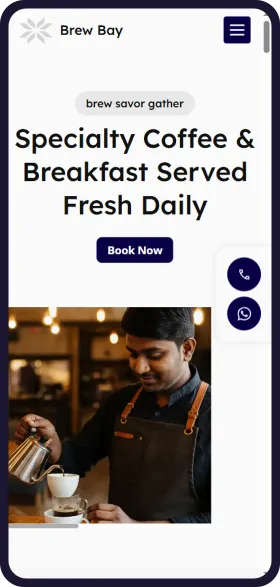
See your cafe & coffee shop website in 1 minute
Open Weaver Studio builds it for you. Type your business name, pick from 6 designs and see it free. No tech skills needed.
FREELeadsSEOSocialAnalytics
₹299/monthSave ₹20,000





6,500+ Businesses
trust Open Weaver

How guests find a cafe online
Trending services
Specialty coffee
Most enquiredGuests ask about beans and brew methods. Show them on the menu.
Cold brew and iced drinks
SeasonalSales rise from March to June. Put cold drinks first in summer.
All-day breakfast
RisingLate risers and tourists want eggs at noon. Say breakfast runs all day.
Weekend brunch
SteadyGroups plan it midweek. Show the brunch menu and take bookings.
Vegan and oat milk options
RisingMore guests ask for dairy-free. Mark these items clearly.
Cakes and desserts to take home
SeasonalOrders peak at Christmas, New Year and birthdays. Show how to pre-order.
How guests search for a cafe on Google
cafe near meNearby
Google shows the closest cafes first. Your map pin and hours matter most.
cafes in White TownBy area
Put your street or area and city in your website title and address.
best cafes in PuducherryBy city
Tourists compare photos and stars. Put your best dishes and reviews near the top.
breakfast open nowBy timing
Show today's hours and breakfast timings on the first screen.
cafe menu with pricesBy price
Put the full menu with prices as text, not just a photo.
specialty coffee near meBy drink
Name your beans, brew methods and roast on the menu.
cold brew coffeeBy drink
Give cold drinks their own section with photos.
cafe with wifi to workFor remote workers
Say if you have Wi-Fi, charging points and quiet hours.
birthday cake order near meBy occasion
Show your cake menu and how many days ahead to order.
How you look on Google
Your Cafe | Cafe in White Town, Puducherry
Specialty coffee, cold brew, crepes and all-day breakfast in White Town, Puducherry. Open daily 8 am to 11 pm. See the menu and book a table on WhatsApp.
- Menu
- Our coffee
- Hours
- Book a table
How guests ask AI about a cafe
Which cafe in White Town serves good coffee and breakfast till late?
People now ask ChatGPT and other AI assistants. A clear menu, area and hours help them name your cafe.
How you show up in AI chatbots
Which cafe in White Town, Puducherry has good coffee and serves breakfast till late?
Your Cafe in White Town, Puducherry serves specialty coffee, cold brew, crepes and all-day breakfast. It is open every day from 8 am to 11 pm and is FSSAI licensed. You can see the menu and book a table on its website or on WhatsApp.
yourcafe.comSample answer. ChatGPT, Gemini and others each word it their own way.
Online rules to know
Ask before you save guest details
All businessesTell guests why you need their name and number for a booking or pre-order, and get their consent before adding them to your offers list.
Keep menu claims honest
All businessesPrices online must match your bill, and say whether GST is extra. Do not call coffee “organic” or “single-origin” unless it is, or use photos of food you do not serve.
Get your FSSAI licence and show it
Cafe & Coffee ShopEvery food business needs FSSAI registration or a licence, applied for on FoSCoS. Display it in your cafe, and print the 14-digit number on every bill. Show it on your website too.
Label your menu correctly
Cafe & Coffee ShopChains with a central licence or outlets in 10 or more places must show calories, allergens and veg or non-veg marks on menus, including online. Smaller cafes should still mark veg, non-veg and allergens clearly.
See before you pay
- Enter details and see 6 free custom websites
- Select and pay only if you like it
- Free support
- 7-day risk-free trial