
How to create a hospital website
Your complete guide to getting a website for your hospital: what to put on it, what patients and families search for, how to market it and the online rules to follow.
Open Weaver Studio builds websites for hospitals and nursing homes. Get a complete website for your hospital. You also get marketing tools to get more patients.
Everything you need to get a website and get customers.
Website: complete website, AI Editor with free support, hosting, SSL and backups, logo, 6 languages, UPI payments, and a free website link.
Leads & Marketing: SEO and Google search, Google Business Profile, WhatsApp and call buttons, leads and CRM, social marketing, and analytics.
Monthly (₹299) and annual (₹2,999) plans include all features. The annual plan gives you 2 months free.
What does this guide contain?
- 1What do you need for a hospital website?What your website needs: content, features and hosting.
- 2How to get more enquiries & patients for your hospitalSimple ways to get more enquiries and patients.
- 3Get a hospital website & marketing tools in 3 stepsSee 6 free websites, pick one and start taking OPD bookings.
More for a hospital owner: search keywords, hospital departments and services, online rules and FAQs.
What do you need for a hospital website?
What content do you need?
0 of 9 done
How to host and maintain it?
0 of 7 done
How to get more enquiries & patients for your hospital
0 of 30 done
One time
Launch your website
Help families trust your hospital
Make booking and reaching you easy
Get found from day one
Ongoing
Marketing to become the hospital families trust
After every discharge
Every month
Get a hospital website & marketing tools in 3 steps
Type your hospital and its departments
Your hospital name, size, departments and area. That is enough to build every page.
Hospital name. Type it as it reads on your building, like "Sanjeevani Multispeciality Hospital".
Beds and departments. Separate them with commas. 120 beds, cardiology, orthopaedics, maternity, paediatrics.
Emergency and area. Add 24x7 emergency and ICU, cashless insurance, your locality and city.
What you will see 
See 6 hospital websites
Each design is laid out for a hospital, with words and pictures in place. Want other options? Generate again.
A layout for many departments. Clear, trustworthy designs that work on a phone and a computer.
OPD booking built in. Departments, doctors, reviews, a booking button, UPI payments, WhatsApp and FAQs are already there.
Written for worried families. Headlines like "Trusted Multispeciality Care with 24x7 Emergency Support" speak to people looking for care.
What you will see 
Choose a design and open for OPD bookings
Pick the design that suits your hospital and go live. Families can book an OPD visit the same day.
Choose your design. Pick the one that suits your hospital. You can switch any time.
Go live. Your website takes OPD bookings as soon as you choose.
Add your own details. Add each doctor's OPD timings, your cashless partners, room and checkup rates, and photos of your wards and ICU.
What you will see 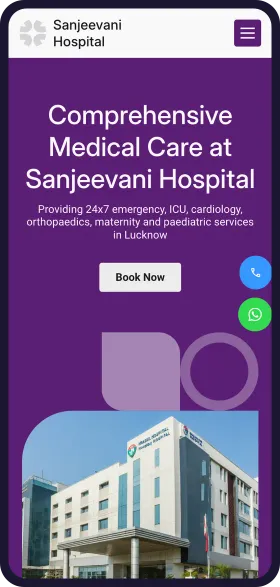
See your hospital website in 1 minute
Open Weaver Studio builds it for you. Type your business name, pick from 6 designs and see it free. No tech skills needed.
FREELeadsSEOSocialAnalytics
₹299/monthSave ₹20,000

6,500+ Businesses
trust Open Weaver

How patients find a hospital online
What families search and ask AI
hospital near meNearby
Google shows the nearest hospitals first. Keep your address, map pin and phone exact.
24 hour emergency hospital near meUrgent
Show your emergency number, ambulance and directions on the first screen.
multispeciality hospital in Gomti NagarBy area
Put your locality and city in your website title and address.
best cardiologist in LucknowBy doctor
Give every specialist a profile with degree, experience and OPD timings.
Dr. Mehta cardiologist OPD timingBy name
Patients search their doctor's name. A page per doctor helps them find you.
full body checkup price in LucknowBy price
List checkup packages with prices and what each includes.
cashless hospital for Star HealthInsurance
List every insurer and TPA you work with by name.
normal delivery hospital with NICUMaternity
Show your labour rooms, NICU and the gynaecologists on call.
knee replacement surgery costPlanned surgery
Give a cost range and say what the package covers.
Which hospital in Gomti Nagar has a cardiologist and accepts cashless insurance?AI assistant
People now ask ChatGPT and other AI assistants. Clear departments, doctors and insurance lists help them name your hospital.
Trending services
OPD consultations
Most enquiredMost visits start with an OPD. Keep every doctor's timings up to date.
Health checkup packages
RisingMore families book yearly checkups. Show packages for men, women and seniors.
Maternity and NICU
SteadyCouples compare hospitals months ahead. Show rooms, doctors and package costs.
Heart care
RisingMore younger patients now. Explain your ECG, echo and cath lab services.
Fever and dengue care
SeasonalCases rise in the monsoon. Share warning signs and your lab timings.
Joint replacement
SteadyA planned surgery that families research. Show the surgeon, the cost range and cashless options.
How you look on Google
yourhospital.com
Your Hospital | Multispeciality Hospital in Gomti Nagar, Lucknow
24x7 emergency and ICU. Cardiology, orthopaedics, maternity and paediatrics. Cashless insurance. Book OPD on WhatsApp.
DepartmentsOur doctorsHealth checkupsBook OPD
How you show up in AI chatbots
Which hospital in Gomti Nagar, Lucknow has a 24 hour emergency and a cardiologist?
Your Hospital in Gomti Nagar, Lucknow has a 24x7 emergency and ICU, with cardiology, orthopaedics and maternity departments. It lists its cashless insurance partners, and you can book an OPD appointment on WhatsApp.
Source: yourhospital.com
Sample answer. ChatGPT, Gemini and others each word it their own way.
Online rules to know
Reviewed October 2026. We check these every year. This is a guide, not legal advice.
Get consent for patient details
All businessesTell families why you need the patient's name, phone and symptoms when they book, and get their consent. Never post patient photos or reports without written permission.
Keep claims and offers honest
All businessesCheckup prices, packages and success claims must be true. Do not call yourself "No. 1" without proof.
Register and display your rates
HospitalRegister your hospital where your state requires it, and display the rates for each service in English and the local language. Your website is a good place to show them too.
Rule: Clinical Establishments (Registration and Regulation) Act, 2010 and Rules, 2012
Never advertise sex determination
HospitalIf you offer ultrasound or maternity care, your website must never suggest or offer finding the sex of a baby, in any words or images.
Questions hospitals ask
How much does a hospital website cost?
It costs ₹299 a month with no setup fee, and the annual plan saves 15% and adds a free domain.
How long does it take to make a hospital website?
About a minute to see your designs. Type your hospital name and departments, and you get six websites to choose from. Then add doctors and timings.
Can I list all my doctors with their OPD timings?
Yes. Add each doctor with a photo, degree, department and OPD days. Update timings or mark leave from your phone.
Where do OPD bookings go?
To your front desk WhatsApp and the enquiry list, with the department and doctor named. Your team confirms the slot.
Can patients pay for health checkups online?
Yes. List each package with its price, and patients pay by UPI. The money goes straight to your bank account with no commission.
Can our staff update the website without IT help?
Yes. Your front desk or admin can change doctors, rates and photos from a phone. Free support is there if you need help.
See before you pay
- Enter details and see 6 free custom websites
- Select and pay only if you like it
- Free support
- 7-day risk-free trial