
How to create a lawyer & legal services website
Your complete guide to a website for your legal practice: what the Bar Council allows on it, how people look for a lawyer, how to share legal awareness and the online rules to follow.
IncludedSEOEnquiriesSocialAnalytics
₹299/monthTry Free
What do you need for a lawyer & legal services website?
Who is your practice?
- 1. Write a plain, factual headline
- 2. Add your enrolment details
- 3. Add your qualifications
- 4. Use a sober name style
1. Write a plain, factual headline
State your chamber name, your areas of practice and your city, like “Advocates for civil, family and criminal matters, Boring Road, Patna”. No slogan, no praise.
See our AI Website BuilderChecklist
2. Add your enrolment details
For each advocate, add the enrolment number, the date of enrolment, the State Bar Council you first enrolled with, the one whose roll you are on now, and your Bar Association.
Checklist
3. Add your qualifications
List each advocate's degrees as they are printed, like BA LLB or LLM, with the university. Leave out titles, past posts and awards.
Checklist
4. Use a sober name style
Show your chamber name in a plain style and calm colours. Use the same plain style on your letterhead and visiting card.
See our Business Logo MakerChecklist
What areas of law do you practise?
- 1. List your areas of practice
- 2. Keep fees off the website
- 3. Add a disclaimer page
- 4. Add your signed declaration
1. List your areas of practice
Name each area in plain words, like civil and property matters, family and divorce, bail, cheque bounce cases and consumer cases.
See our AI Website EditorChecklist
2. Keep fees off the website
Fees are not among the details the Bar Council lets you show. Discuss them in person, then let clients pay the agreed fee by UPI.
See our UPI Payments on WebsiteChecklist
3. Add a disclaimer page
Before the site opens, show a note that the Bar Council does not allow advocates to solicit work, that the site is for information only, and that visiting it does not create an advocate-client relationship.
Checklist
4. Add your signed declaration
The Bar Council's website Schedule ends with a declaration that the information given is true, with the advocate's name and signature.
Checklist
How can clients check your details?
- 1. Match your Bar Council roll
- 2. Introduce your associates
- 3. Leave out reviews and results
- 4. Keep client matters private
1. Match your Bar Council roll
Every detail on the site must match your entry on the State Roll. Update the site the day your address, roll or Bar Association changes.
Checklist
2. Introduce your associates
Add each associate advocate with the same details as yours, and nothing more. Juniors who are not yet enrolled should not be listed as advocates.
Checklist
3. Leave out reviews and results
Do not show testimonials, star ratings, client names, cases won or media coverage. Do not say you were a judge, an Advocate General or a Bar Council member.
Checklist
4. Keep client matters private
Never post a client's papers, order sheets, case photos or WhatsApp chats, even with names hidden. What a client tells you stays between you.
Checklist
How can people reach you?
- 1. Add a consultation request form
- 2. Add phone, WhatsApp and email
- 3. Clearly show your location
- 4. Add your working hours
- 5. Add your social media links
- 6. Offer your website in local languages
1. Add a consultation request form
A Request a Consultation button on every page. Ask for the name, phone, the kind of matter and the court, if a case is already filed.
See our Leads, Orders & AppointmentsChecklist
2. Add phone, WhatsApp and email
Show your chamber phone, WhatsApp and email at the top and bottom of every page. Many people first send a photo of the notice they received.
Checklist
3. Clearly show your location
Add your chamber address on Boring Road, a landmark and a Google Map. Add your seat at the court complex too, if you meet clients there.
Checklist
4. Add your working hours
Show the hours you meet clients at the chamber, and when you are in court. Add court vacation dates as they are announced.
Checklist
5. Add your social media links
Link your LinkedIn, Facebook and YouTube in the footer, where you share legal awareness posts. Do not ask visitors to like or follow.
Checklist
6. Offer your website in local languages
Show your areas of practice, address and disclaimer in Hindi or Urdu, so families who read little English understand them.
See our Multi-language WebsiteChecklist
How to host and maintain your website?
- 1. Choose a domain name
- 2. Put your website on hosting
- 3. Turn on SSL
- 4. Make your website open fast (CDN)
- 5. Keep backups of your website
- 6. Keep your website up to date
1. Choose a domain name
This is your website address, like kumarprasadlaw.in. Keep it to your chamber or family name, without words like “best” or “top”.
See our Domain Name GeneratorChecklist
2. Put your website on hosting
Hosting keeps your website online, so someone who gets a legal notice in the evening can send a consultation request that night.
See our Website Hosting & SSLChecklist
3. Turn on SSL
SSL puts a lock next to your web address and keeps phone numbers and details of a matter private when people send a request.
See our Website Hosting & SSLChecklist
4. Make your website open fast (CDN)
A CDN keeps copies of your website in many cities, so it opens fast for a family member in Delhi or the Gulf following a case in Patna.
See our Website Hosting & SSLChecklist
5. Keep backups of your website
A backup is a saved copy of your website, made every day, so your enrolment details, declaration and disclaimer are never lost.
See our Website Hosting & SSLChecklist
6. Keep your website up to date
Add a new associate, change your hours or update your address the day it changes. Pick a website you can edit from your phone.
See our AI Website EditorChecklist
Pick your areas of practice, see your lawyer website
Get my websiteHow to help people find your legal practice, within Bar Council rules
SEO – Get found on Google & AI
- 1. Set up and update your website SEO
- 2. Set up your Google Business Profile
- 3. Check Google can find your site
- 4. Add your chamber to map apps
- 5. Keep your Google profile factual
1. Set up and update your website SEOOngoing
Do this with your website, then keep it current. Give Google and AI assistants a clear, factual picture of your chamber: keywords for your areas of practice and area, a page title and description, one main heading (H1) on each page, a favicon, and structured data with your address, phone and hours.
See our Automatic Website SEOChecklist
2. Set up your Google Business ProfileOne time
Add only facts, the same as your website. Pick “Lawyer” as your main category, and add your areas of practice, hours and an office photo.
Checklist
3. Check Google can find your siteOne time
Make sure your website is on Google, so people searching for an advocate near Boring Road can find your details.
See our Google Search CheckChecklist
4. Add your chamber to map appsOne time
Use the same name, address and phone as your website. Skip paid lawyer apps that rank advocates or sell leads.
Checklist
5. Keep your Google profile factualOngoing
Google may show reviews you did not ask for. Do not ask for reviews, offer anything for one or share them anywhere.
Checklist
Social Media Marketing
- 1. Set up LinkedIn, Facebook, YouTube
- 2. Share one legal awareness post
- 3. Post on legal awareness days
1. Set up LinkedIn, Facebook, YouTubeOne time
Use your chamber name in plain type and the same facts as your website. These pages are for legal awareness only.
Checklist
2. Share one legal awareness postOngoing
Pick one idea a week. Explain the law in plain words, with no case results, fees or “contact us for your case”.
See our Social Media MarketingPost ideas
3. Post on legal awareness daysOngoing
Plan a post for the days that are about rights and justice. Keep it to information, not your practice.
Occasion ideas
WhatsApp Marketing
- 1. Set up your WhatsApp Business profile
- 2. Post on WhatsApp status weekly
- 3. Send hearing date reminders
- 4. Send updates to existing clients
1. Set up your WhatsApp Business profileOne time
Add your chamber name, address, hours and a link to your disclaimer. Keep the profile to facts.
Checklist
2. Post on WhatsApp status weeklyOngoing
Pick one idea a week. People who saved your number see it for a day. Share information, never a request for work.
See our WhatsApp Status Post MakerStatus ideas
3. Send hearing date remindersOngoing
Message existing clients before each step of their own matter. Use their name, the court and what they need to bring.
See our Leads, Orders & AppointmentsReminder ideas
4. Send updates to existing clientsOngoing
Send one message a month to your broadcast list of existing clients only. Never message strangers or offer anything.
Message ideas
Paid Ads on Google, Insta, FB
- 1. Run Google Ads for legal searches
- 2. Run Instagram and Facebook ads
1. Run Google Ads for legal searchesOne time
Paid search ads ask people to hire you, which is advertising for work.
Not allowed for advocates
- Instead
- Put the time into a complete Google Business Profile, a website that lists your Schedule details and areas of practice, and one legal awareness post a week. People searching by area and matter find you through these.
- Why?
- Rule 36 of the Bar Council of India Rules bars advocates from soliciting work or advertising, directly or indirectly. A paid ad can lead to a misconduct case under the Advocates Act.
Checklist
2. Run Instagram and Facebook adsOne timeOngoing
Boosted posts and lead form ads put your chamber in front of people who did not ask, which counts as advertising.
Not allowed for advocates
- Instead
- Post legal awareness explainers on your own pages and share them with existing clients on WhatsApp. People who find them useful pass them on.
- Why?
- Rule 36 also covers electronic media, so boosting a post or running a lead ad for your practice is soliciting work. Keep your pages to information only.
Set up once
Every month
Others
- 1. Put your link on your stationery
- 2. Print a QR code poster
- 3. Check visits and enquiries monthly
1. Put your link on your stationeryOne time
Add your web address where clients already see your name. Do not use pamphlets, hoardings, newspaper ads or bulk messages.
Checklist
2. Print a QR code posterOne time
Existing clients at your chamber scan it to send their documents or check your hours. Keep it inside the chamber, not outside.
See our QR Code Poster MakerChecklist
3. Check visits and enquiries monthlyOngoing
See which areas of practice people read most, and whether they come from Google, Maps or a shared link.
See our Website AnalyticsChecklist
Pick your areas of practice, see your lawyer website
Tap the areas you practise in
Enter practice or chamber name
Get a lawyer & legal services website & awareness tools in 3 steps
Type your chamber and areas of practice
Your chamber name, your areas of practice and your enrolment. That is all we need to start.
Chamber name. Type it the way it appears on your letterhead, like "Kumar & Prasad Law Chambers".
Areas of practice. Separate them with commas. Civil and property matters, family and divorce, bail, cheque bounce and consumer cases.
Enrolment, court and area. Add your State Bar Council, the court you practise at and your locality, like Bar Council of Bihar, Patna High Court, Boring Road, Patna.
What you will see 
See 6 lawyer websites
Each design is laid out for a legal practice, with words and pictures already in place. Want other options? Generate again.
A sober, plain layout. Designs that put your areas of practice, enrolment details and chamber address where a visitor looks first.
Built-in requests. Areas of practice, advocates, a Book Now button for consultation requests, WhatsApp and a map are already on the page. Add the disclaimer yourself.
Edit the headline to plain facts. The AI writes headlines like "Trusted Legal Experts for Your Peace of Mind". Words like trusted or expert are claims, so change it to what you practise and where, like "Civil, family and property matters, Patna".
What you will see 
Choose one and check every detail
Pick the design that suits your chamber, remove anything outside the Bar Council's list, and go live.
Choose your design. Pick the one that looks right for your chamber. You can switch to another design any time.
Go live. Your website takes consultation requests as soon as you choose.
Add your own details. Add each advocate's enrolment number and date, qualifications, the disclaimer and your signed declaration.
What you will see 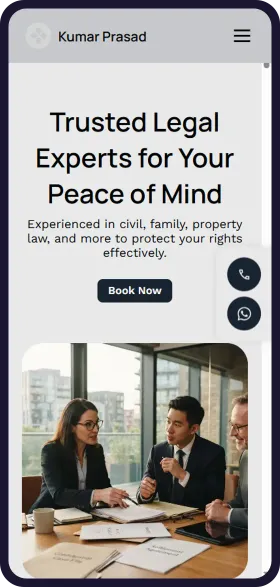
See your lawyer & legal services website in 1 minute
Open Weaver Studio builds it for you. Type your business name, pick from 6 designs and see it free. No tech skills needed.
FREELeadsSEOSocialAnalytics
₹299/monthSave ₹20,000





6,500+ Businesses
trust Open Weaver

How people look for a lawyer online
Trending areas of practice
Property and land disputes
Most enquiredFamily land, boundaries and title papers bring the most enquiries. List civil and property matters first.
Bail matters
SteadyEnquiries come at any hour. Keep your phone and WhatsApp easy to find.
Mutual consent divorce
RisingMore couples choose a settled separation. Keep the enquiry form short and private.
Cheque bounce cases
SteadySmall traders and lenders search after a cheque is returned. Name the area plainly.
Consumer complaints
RisingOnline filing has made consumer cases easier to start. List them if you take them.
Wills and family settlements
SteadyFamilies plan ahead or settle property after a death. Add it to your areas if you draft them.
How people search for a lawyer on Google
lawyer near meNearby
The most common search. Google shows chambers close to the person, so keep your address the same everywhere.
advocate in Boring Road PatnaBy area
Put your locality and city in your website title and address.
property lawyer in PatnaBy city
People search by the kind of matter and the city. List each area of practice by name.
bail lawyer urgentUrgent
Families search this the night of an arrest. Show your phone and WhatsApp on the first screen.
lawyer consultation fees in PatnaBy price
You cannot list fees. Make it easy to call or send a consultation request instead.
lawyer for land dispute in BiharBy matter
Name civil and property matters plainly, in Hindi too.
cheque bounce case advocateBy matter
Name cheque bounce cases as an area of practice, in the words people use.
mutual consent divorce lawyerBy matter
Families search quietly. A plain list of areas and a private form help them reach out.
consumer court lawyer for refundFor consumers
List consumer cases if you take them. People look after a refund is refused.
How you look on Google
Your Chambers | Advocates in Boring Road, Patna
Advocates enrolled with the Bar Council of Bihar. Civil and property, family and divorce, bail, cheque bounce and consumer cases. Patna High Court.
- Areas of practice
- Advocates
- Disclaimer
- Contact
How people ask AI about a lawyer
Which advocate near Boring Road, Patna handles property disputes at Patna High Court?
People now ask ChatGPT and other AI assistants. Clear areas of practice, courts and your address help them name your chamber.
How you show up in AI chatbots
Is there an advocate near Boring Road, Patna who handles property disputes at Patna High Court?
Your Chambers on Boring Road, Patna lists civil and property matters, family and divorce, bail, cheque bounce and consumer cases as its areas of practice. Its advocates are enrolled with the Bar Council of Bihar and practise at Patna High Court. You can send a consultation request on its website or on WhatsApp.
yourlawchambers.comSample answer. ChatGPT, Gemini and others each word it their own way.
Online rules to know
Get consent for enquiry details
All businessesTell people why your form asks for their name, phone and the kind of matter, and get their consent. Use the details only to reply, and delete requests you do not take up.
Use only words and photos you own
All businessesWrite your own pages and awareness posts. Do not copy another chamber's website text, a news photo or a legal blog without permission.
Rule: Copyright Act, 1957
Show only the Bar Council's list
Lawyer & Legal ServicesAdvocates may not solicit work or advertise. Your website may show only your name, address, phone, email, enrolment details, Bar Council and Bar Association, qualifications and areas of practice, with a signed declaration that they are true.
Rule: Bar Council of India Rules, Part VI, Chapter II, Rule 36 and its website Schedule (2008)
Keep client communications confidential
Lawyer & Legal ServicesAn advocate may not disclose what a client told them in confidence without the client's consent. Never post case papers, chats or details of a matter, even as an example.
See before you pay
- Enter details and see 6 free custom websites
- Select and pay only if you like it
- Free support
- 7-day risk-free trial