
How to create a homestay website
Your complete guide to getting a website for your homestay: what to put on it, what guests search for, how to market it and the online rules to follow.
Open Weaver Studio builds websites for homestays. Get a complete website for your homestay. You also get marketing tools to get more guests.
Everything you need to get a website and get customers.
Website: complete website, AI Editor with free support, hosting, SSL and backups, logo, 6 languages, UPI payments, and a free website link.
Leads & Marketing: SEO and Google search, Google Business Profile, WhatsApp and call buttons, leads and CRM, social marketing, and analytics.
Monthly (₹299) and annual (₹2,999) plans include all features. The annual plan gives you 2 months free.
What does this guide contain?
- 1What do you need for a homestay website?What your website needs: content, features and hosting.
- 2How to get more enquiries & guests for your homestaySimple ways to get more enquiries and guests.
- 3Get a homestay website & marketing tools in 3 stepsSee 6 free websites, pick one and start taking direct bookings.
More for a homestay owner: search keywords, homestay services, online rules and FAQs.
What do you need for a homestay website?
What content do you need?
0 of 8 done
How to host and maintain it?
0 of 7 done
How to get more enquiries & guests for your homestay
0 of 30 done
One time
Launch your website
Help guests trust your home
Make booking easy
Get found from day one
Ongoing
Marketing to keep your rooms booked
After every stay
Through the year
Get a homestay website & marketing tools in 3 steps
Describe your homestay in a line or two
Your homestay name, your rooms and what makes the stay special. That is all we need to start.
Homestay name. Type it the way it reads on your gate, like "Kaapi Kadu Homestay".
Rooms, food and activities. Separate them with commas. 4 rooms, coffee estate, home-cooked meals, plantation walk, bonfire.
Sights and location. Add the famous places nearby, your town and district, so travellers looking at a map find you.
What you will see 
See 6 homestay websites
Each design is laid out for a homestay, with the words and pictures already in place. Want other options? Generate again.
A layout for a home, not a hotel. Warm designs with big photos of the house and the land around it, on a phone and a computer.
Booking built in. Rooms, meals, things to do, reviews, Book Now, UPI payments, WhatsApp and FAQs are already there.
Written for travellers. Headlines like "Experience Cozy Stays Amid Coorg's Coffee Estates" tell guests what kind of stay to expect.
What you will see 
Pick one and take bookings
Choose the design that feels like your home and go live. Guests can ask for dates the same day.
Choose your design. Pick the one that suits your homestay. You can switch to another design any time.
Go live. Your website is open for direct bookings the moment you choose.
Add your own details. Upload photos of each room and your meals, your tariff per night, house rules and the route from the bus stand.
What you will see 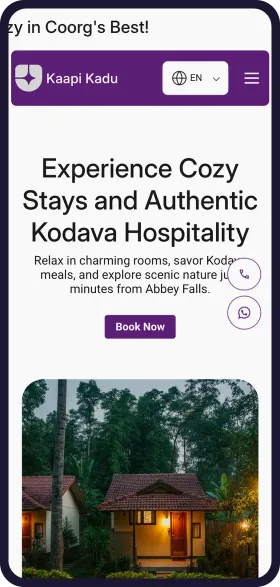
See your homestay website in 1 minute
Open Weaver Studio builds it for you. Type your business name, pick from 6 designs and see it free. No tech skills needed.
FREELeadsSEOSocialAnalytics
₹299/monthSave ₹20,000





6,500+ Businesses
trust Open Weaver

How guests find a homestay online
What guests search and ask AI
homestay near meNearby
Travellers already on the road search this. Keep your map pin and phone number correct.
homestay in MadikeriBy town
Put your town and district in your website title and address.
best homestay in CoorgBest
Reviews and real photos decide who shows up for "best". Ask every happy guest for one.
coffee estate stay CoorgBy setting
Say what is around the house: estate, river, forest or paddy fields.
homestay near Abbey FallsBy sight
Name the famous sights near you and the driving time to each.
homestay with food CoorgBy food
List your meals and say if they are veg, non-veg or both.
Coorg homestay under 3000By price
Show your tariff per night clearly so price searches find you.
pet friendly homestay CoorgBy need
If you allow pets, kids or large groups, say it in a heading.
homestay available this weekend CoorgLast minute
Make the Check Availability button easy to find on a phone.
Which homestay in Coorg has home-cooked Kodava food and a plantation walk?AI assistant
People now ask ChatGPT and other AI assistants. Clear food, activities and location help them name your homestay.
Trending stays
Estate and plantation stays
Most enquiredThe stay most guests ask for in the hills. Lead with the estate and the walk.
Weekend getaways from the city
RisingFamilies from nearby cities book Friday to Sunday. Show a two night tariff.
Workations with good Wi-Fi
RisingRemote workers stay a week or more. Say your Wi-Fi speed and if there is a desk.
Monsoon stays
SeasonalRain lovers book for the mist and waterfalls. Share monsoon photos from June.
Pet friendly rooms
RisingMore guests travel with dogs. Say your rules for pets in one clear line.
Home food experiences
SteadyGuests ask for local meals and cooking demos. Show the dishes you make.
How you look on Google
yourhomestay.com
Your Homestay | Homestay in Madikeri, Coorg
4 rooms on a coffee estate, home-cooked Kodava meals, plantation walk and bonfire. 10 minutes from Abbey Falls. Check availability on WhatsApp.
Rooms and tariffHome foodThings to doCheck availability
How you show up in AI chatbots
Which homestay near Madikeri has home food and a plantation walk?
Your Homestay in Madikeri, Coorg has 4 rooms on a working coffee estate, with home-cooked Kodava meals, a morning plantation walk and an evening bonfire. Abbey Falls is about 10 minutes away, and you can check availability on WhatsApp.
Source: yourhomestay.com
Sample answer. ChatGPT, Gemini and others each word it their own way.
Online rules to know
Reviewed October 2026. We check these every year. This is a guide, not legal advice.
Ask before you collect guest details
All businessesTell guests why you need their name, phone and ID proof, and get their consent. Keep ID copies safe and do not share them.
Show the true tariff and real photos
All businessesDo not hide extra charges for meals or bonfires, and do not use photos of another property or views you do not have.
Register your homestay
HomestayMost states have a homestay or bed and breakfast scheme run by the state tourism department. Where there is none, the Ministry of Tourism classifies homestays. Show your registration on your website.
Rule: Your state homestay scheme, or the Ministry of Tourism Incredible India Bed and Breakfast scheme
Report foreign guests within 24 hours
HomestayHomestays must report every foreign guest online within 24 hours of arrival. This form was called Form C and is now Form-III. Keep the records for at least a year.
Rule: Immigration and Foreigners Act, 2025, Form-III (formerly Form C)
Questions homestay owners ask
How much does a homestay website cost?
It costs ₹299 a month with no setup fee, and the annual plan saves 15% and adds a free domain.
How long does it take to make a homestay website?
About a minute to see your designs. Type your homestay name, your rooms and what is nearby, and you get six websites to choose from. Then add your room photos and tariffs.
Do I still need booking sites if I have my own website?
Many homestays keep both. Booking sites bring new guests, and your website takes repeat and referred guests directly, with no commission on those bookings.
Can guests pay an advance on my website?
Yes. Guests pay by UPI straight to your bank account with no commission. Show your cancellation terms next to the payment button.
Can I post photos of my guests?
Only with their permission. Ask before you take or share a photo, and never post their ID or room number.
Can I mark rooms as full from my phone?
Yes. Change tariffs, mark dates as full and add new photos from your phone. Free support is there if you get stuck.
See before you pay
- Enter details and see 6 free custom websites
- Select and pay only if you like it
- Free support
- 7-day risk-free trial