
How to create a hostel and PG website
Your complete guide to getting a website for your hostel or PG: what to put on it, what students and working professionals search for, how to market it and the online rules to follow.
IncludedSEOBookingsSocialAnalytics
₹299/monthTry Free
What do you need for a hostel and PG website?
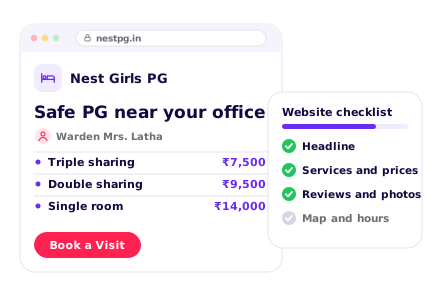
Why should residents choose your PG?
- 1. Write a clear headline
- 2. Show what makes you different
- 3. Write your About section
- 4. Show your numbers
- 5. Use a logo and PG colours
1. Write a clear headline
Say what you do and where, in one line, like “Safe girls PG near Sector 62, Noida, with home-style food”. Put a Book a Visit button right beside it.
See our AI Website BuilderChecklist
2. Show what makes you different
Give 3 reasons to pick your PG, near the top of the page: home-style meals, CCTV and biometric entry, a female warden, or a short walk to offices and colleges.
Checklist
3. Write your About section
Say when you started, who runs the PG and why residents keep coming back. Add one line on how you look after residents, like “Safe, clean and homely, every single day”.
Checklist
4. Show your numbers
Numbers build confidence fast: years running, residents stayed and beds. Keep them true and up to date.
Checklist
5. Use a logo and PG colours
A clear logo and clean, consistent colours make your PG look trusted and easy to remember.
See our Business Logo MakerChecklist
What rooms do you offer?
- 1. List your sharing options
- 2. Show your rent
- 3. Add your meals and services
- 4. Add your payment options
- 5. Show your rooms and common areas
1. List your sharing options
List single, double and triple sharing, with what each room has, like a bed, cupboard, study table and attached bathroom.
Checklist
2. Show your rent
Show the monthly rent for each sharing, the deposit and notice period, and what rent includes.
See our AI Website EditorChecklist
3. Add your meals and services
Share your weekly menu, laundry, housekeeping and Wi-Fi. Share facts, not promises.
Checklist
4. Add your payment options
Say if you take UPI and cards. Let residents pay the booking amount and monthly rent by UPI on your website.
See our UPI Payments on WebsiteChecklist
5. Show your rooms and common areas
Show the rooms, bathrooms, dining area and common room.
Checklist
How can residents and parents trust your PG?
- 1. Introduce your warden and staff
- 2. Add a photo gallery
- 3. Show reviews from residents
- 4. Explain your safety and rules
- 5. Answer common questions
1. Introduce your warden and staff
Add a photo of the owner or warden, and mention the cook and caretaker. Mention a female caretaker for girls PGs.
Checklist
2. Add a photo gallery
Real photos of rooms, bathrooms, the kitchen and food. Add new ones when you repaint or add rooms.
See our AI Website EditorChecklist
3. Show reviews from residents
Add 3 to 5 real reviews, with the resident's consent, and link to your Google reviews. Notes like “felt safe from day one, and the food tastes like home” work best.
Checklist
4. Explain your safety and rules
Mention CCTV, biometric entry, the warden, fire safety and police verification. Share your gate timings and visitor rules.
Checklist
5. Answer common questions
Add an FAQ section with short, clear answers: “Is food included in rent?”, “What is the notice period?”, “Are visitors allowed?”. Clear answers also help Google and AI assistants describe your PG.
See our Automatic Website SEOChecklist
How can residents reach your PG?
- 1. Add booking and enquiry forms
- 2. Add phone, WhatsApp and email
- 3. Show your address on a map
- 4. Add your working hours
- 5. Add your social media links
- 6. Offer your website in local languages
1. Add booking and enquiry forms
A Book a Visit button on every page, and an enquiry form with move-in date and sharing type, so people can reach you any time.
See our Leads, Orders & AppointmentsChecklist
2. Add phone, WhatsApp and email
Show your phone, WhatsApp and email at the top and bottom of every page. Add buttons so people can call or chat in one tap.
Checklist
3. Show your address on a map
Add your full address with a nearby landmark. Add a Google Map so people can get directions in one tap. Mention nearby offices, colleges and bus or metro stops.
Checklist
4. Add your working hours
Show your office and visiting hours for new enquiries, and your gate timings.
Checklist
5. Add your social media links
Link your Instagram, Facebook and Google Maps in the menu or the footer.
Checklist
6. Offer your website in local languages
Show your rent, rules and menu in Hindi, Tamil, Marathi or whichever language your parents speak at home.
See our Multi-language WebsiteChecklist
How to host and maintain your website?
- 1. Choose a domain name
- 2. Put your website on hosting
- 3. Turn on SSL
- 4. Make your website open fast (CDN)
- 5. Keep backups of your website
- 6. Keep your website up to date
1. Choose a domain name
This is your website address, like tulipnestpg.in. Use your PG name, and add your area if the name is taken.
See our Domain Name GeneratorChecklist
2. Put your website on hosting
Hosting keeps your website online, day and night.
See our Website Hosting & SSLChecklist
3. Turn on SSL
SSL puts a lock next to your web address and makes it start with https.
See our Website Hosting & SSLChecklist
4. Make your website open fast (CDN)
A CDN keeps copies of your website in many cities, so it opens fast wherever people are.
See our Website Hosting & SSLChecklist
5. Keep backups of your website
A backup is a saved copy of your website, made every day.
See our Website Hosting & SSLChecklist
6. Keep your website up to date
Change your rent, beds available and menu whenever they change. Pick a website you can edit from your phone.
See our AI Website EditorChecklist
How to get more enquiries & residents for your hostel or PG
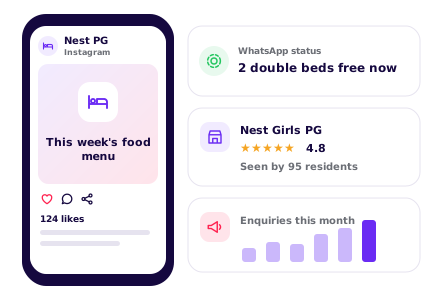
SEO – Get found on Google & AI
- 1. Set up and update your website SEO
- 2. Set up your Google Business Profile
- 3. Check Google can find your site
- 4. List your PG on directories
- 5. Ask happy residents for reviews
1. Set up and update your website SEOOngoing
Do this with your website, then keep it current. Give Google and AI assistants a clear picture of your PG: keywords for your rooms and area, a page title and description, one main heading (H1) on each page, a favicon, and structured data with your address, phone and hours.
See our Automatic Website SEOChecklist
2. Set up your Google Business ProfileOne time
Use the same PG name, address and phone as your website. Pick “Hostel” as your main category.
Checklist
3. Check Google can find your siteOne time
Make sure your website is on Google, so residents searching for a PG or hostel in your area can see it.
See our Google Search CheckChecklist
4. List your PG on directoriesOne time
Use the same name, address and phone everywhere, and link back to your website.
Checklist
5. Ask happy residents for reviewsOngoing
Send your review link on WhatsApp after a resident's first month.
Checklist
WhatsApp Marketing
- 1. Set up your WhatsApp Business profile
- 2. Post on WhatsApp status weekly
- 3. Send reminders for rent and renewals
- 4. Share promotions and special offers
1. Set up your WhatsApp Business profileOne time
Add your PG name, logo, timings and address.
Checklist
2. Post on WhatsApp status weeklyOngoing
Pick one idea a week. Everyone who saved your number sees it for a day.
See our WhatsApp Status Post MakerStatus ideas
3. Send reminders for rent and renewalsOngoing
Message each resident before rent is due, and before their stay ends.
See our Leads, Orders & AppointmentsReminder ideas
Paid Ads on Google, Insta, FB
- 1. Run Google Ads for nearby searches
- 2. Run Instagram and Facebook ads
1. Run Google Ads for nearby searchesOne time
Google Ads puts your PG at the top of Google and on Google Maps when people search for a PG near a college or office.
Best campaign for a hostel or PG
- Campaign
- Search, with your PG location added
- Where?
- At the top of Google search results, marked “Sponsored”. With your location added, it also shows on Google Maps, with Directions and Call buttons.
- Who?
- Students, parents and new joiners who search for a PG in your area, even from their home town. Set this under Locations: add a radius around your PG and the cities your residents come from, and under Location options keep “Presence or interest”.
- Targeting tips
- Radius: 2–4 km around your PG. Also add the cities your students come from, and bid on searches that name your area
- Keywords: “PG near [college or office park]”, “girls hostel in [your area]”, “PG with food [your city]”, “single room PG near me”
- Negative keywords: jobs, hostel warden, sale, buy flat, hotel
- When: spend most from May to August, and before campus joining dates
- Budget: ₹200–₹600 a day in season
- Why?
- Students and new joiners search for a PG near the college or office, often from their home town before they move.
Checklist
2. Run Instagram and Facebook adsOne timeOngoing
Meta ads show your PG to students and young professionals while they scroll Instagram and Facebook.
Best campaign for a hostel or PG
- Campaign
- Click-to-WhatsApp ad with a room tour reel
- Where?
- In Instagram feed, Stories and Reels, and in the Facebook feed. Tapping the ad opens a WhatsApp chat with your PG.
- Who?
- Students and young professionals near your PG, plus parents in the cities your residents come from. Set this under Audience: drop a pin on your PG, set the radius, then set the age.
- Targeting tips
- Radius: 3–5 km around your PG, plus your residents' home cities for parents
- Age: 18–28, and 40–55 for parents
- If Ads Manager asks, mark the ad as Housing. That limits age and gender targeting, so rely on location instead
- Placements: leave on automatic, Reels work well
- Budget: ₹200–₹500 a day from May to August. Run it for at least 7 days before you judge it
- Ad: a room and food tour with the rent
- Why?
- Students check rooms on Instagram, then ask on WhatsApp. A tour reel with the rent answers the first questions.
Set up once
Every month
Others
- 1. Put your website link everywhere
- 2. Print a QR code poster
- 3. Share your link with partners nearby
- 4. Check visits and enquiries monthly
1. Put your website link everywhereOne time
On paper and online: every place a resident or parent might look you up.
Checklist
2. Print a QR code posterOne time
Residents scan it to save your number, refer a friend or leave a review.
See our QR Code Poster MakerChecklist
4. Check visits and enquiries monthlyOngoing
See which rooms people look at most, like single or twin sharing, and move them higher on your page.
See our Website AnalyticsChecklist
Pick what you offer, see your hostel and PG website
Tap what your hostel or PG offers
Enter hostel or PG name
Want to see how it works? See how the hostel and PG website builder works
How residents find a hostel or PG online

Trending stays
Girls PG with meals
Most enquiredThe PG parents ask about most. Lead with safety and the weekly menu.
Single rooms
RisingMore residents pay extra for privacy. Show single room rent and photos.
Co-living for professionals
RisingWorking people want Wi-Fi, housekeeping and flexible timings. Say it up front.
Admission season stays
SeasonalStudents hunt in June and July. Share free beds before college opens.
PGs near metro stations
SteadyCommute time decides the pick. Name the station and walk time.
Short stays for interns
SeasonalInterns need 2 to 6 month stays. Say if you take short stays.
Based on enquiries on Open Weaver hostel and PG websites, 2026.
How residents search for a hostel or PG on Google
PG near meNearby
The top search. Keep your map pin, photos and phone number correct.
girls PG in Sector 62 NoidaBy area
Put your sector or locality and city in your website title.
PG near Noida Electronic City metroBy metro
Name the closest metro station and the walk time.
PG near Amity University NoidaBy campus
List the colleges and coaching centres near you.
single room PG with food NoidaBy room
Give each sharing type its own section with rent.
PG under 10000 NoidaBy price
Show rent clearly so price searches find you.
safe girls hostel with CCTVSafety
Show CCTV, biometric entry and warden details with photos.
PG for working professionals near IT parkFor professionals
Say your timings suit office hours and mention Wi-Fi speed.
PG available from 1st of next monthMove-in
Say which beds are free and from when.
How you look on Google
Your PG | Girls PG and Hostel in Sector 62, Noida
Single, double and triple sharing with 3 meals a day, Wi-Fi, AC rooms and laundry. CCTV, biometric entry, near the metro. Book a visit on WhatsApp.
- Rooms and rent
- Food menu
- Safety
- Book a visit
How residents ask AI about a hostel or PG
Which girls PG near Sector 62 metro has good food and CCTV?
People now ask ChatGPT and other AI assistants. Clear rent, food, safety and location help them name your PG.
How you show up in AI chatbots
Which girls PG near Sector 62 Noida has meals and good security?
Your PG in Sector 62, Noida offers single, double and triple sharing with 3 meals a day, Wi-Fi, AC rooms and laundry. It has CCTV and biometric entry, is about 5 minutes from the metro, and you can book a visit on WhatsApp.
yourpg.comSample answer. ChatGPT, Gemini and others each word it their own way.
Online rules to know

Ask before you collect resident details
All businessesTell residents and parents why you need their name, phone, ID and college or office details, and get their consent. Keep ID copies safe.
Show the true rent and real rooms
All businessesDo not hide electricity, maintenance or food charges, and do not show photos of rooms or facilities you do not have.
Get residents verified by the police
Hostel & PGMost state police ask landlords and PG owners to verify tenants and residents. In Uttar Pradesh this can be done online. Check your local police rules and keep the records.
Rule: Tenant and resident verification, Uttar Pradesh Police
Hold a food licence if you serve meals
Hostel & PGA PG kitchen that serves meals to residents needs FSSAI registration or a licence. Show the number on your website and menu.
Rule: Food Safety and Standards Act, 2006, FSSAI registration
Hostel and PG website FAQs
Do PG residents need police verification?
Most state police ask landlords and PG owners to verify tenants and residents. In Uttar Pradesh this can be done online, under Tenant and resident verification, Uttar Pradesh Police. Check your local police rules, keep the records, and mention police verification on your website.
Does my PG need a food licence to serve meals?
Yes. A PG kitchen that serves meals to residents needs FSSAI registration or a licence, under the Food Safety and Standards Act, 2006, FSSAI registration. Show the number on your website and menu.
Can I show rent without electricity and maintenance charges?
No. Do not hide electricity, maintenance or food charges, and do not show photos of rooms or facilities you do not have. The CCPA Guidelines on Misleading Advertisements, 2022 apply. Show the monthly rent for each sharing, the deposit, notice period and what rent includes.
What safety details do parents look for on a PG website?
CCTV, biometric entry, the warden, fire safety and police verification, with photos. Share your gate timings and visitor rules, and mention a female caretaker for girls PGs. Parents search for things like "safe girls hostel with CCTV".
How do students find a PG near their college or metro?
They search by campus and station, like "PG near Amity University Noida". Name the closest metro station and the walk time, and list the colleges, coaching centres and offices near you. Send your link to their admin or HR teams too.
When do most students and new joiners look for a PG?
Students hunt in June and July, so share free beds before college opens and spend most on ads from May to August. Campus joining dates bring new joiners, and interns need 2 to 6 month stays. Say if you take short stays.
Create your hostel and PG website with your favourite features
All 14 features included for ₹299/month.0 from your checklist
Website
- AI Builder
- AI Editor
- Hosting & SSL
- Logo Maker
- Multi-language
- UPI Payments
- Domain Names
Marketing
- SEO
- Google Search Check
- Leads & Appointments
- Social Posts
- WhatsApp Status
- QR Posters
- Analytics
- See 6 free custom websites
- Select and pay only if you like it
- Free support
- 7-day risk-free trial